参考

  • 数据密集型系统

Quorum介绍

Quorum模式常用于分布式场景,保证数据的一致性。其中有两个核心参数

  • Qw 代表数据写入(包括更新、删除)需要的节点数
  • Qr 代表数据读取需要的节点数

如果你总共有N个节点,那么很容易得出只要 W+R>N,那么你的读请求和写请求一定有重叠的节点,这就保证了一致性,你总是能找到最新的那个写入请求

Quorum的不一致场景

但Quorum模式并不一定是万无一失的,他在如下场景会导致不一致

  • 如果两个写操作同时发生,则无法明确先后顺序,最终需要额外的修复手段
  • 如果写操作和读操作同时发生,写操作可能仅在一部分副本上完成。此时,读取时返回旧值还是新值存在不确定性
  • 如果某些副本上已经写入成功,而其他一些副本发生写入失败(如磁盘已满),且总的成功副本数少于w,那些已成功的副本上不会做回滚。这意味着尽管这样的写操作被视为失败,后续的读操作仍可能返回新值

还有两个更加边界的场景

Sloppy Quorum

也叫做宽松的Quorum模式,就是说当N不够的情况下,可以把集群的其他节点当作Qw节点。如果采用了sloppy
quorum,写操作的w节点和读取的r节点可能完全不同,因此无法保证读写请求一定存在重叠的节点

数据的恢复场景

进行数据的恢复在所难免,如cassandra就有读修复等,如果具有新值的节点后来发生失效,但恢复数据来自某个旧值,则总的新值副本数会低于w,这就打破了之前的判定条件

前言

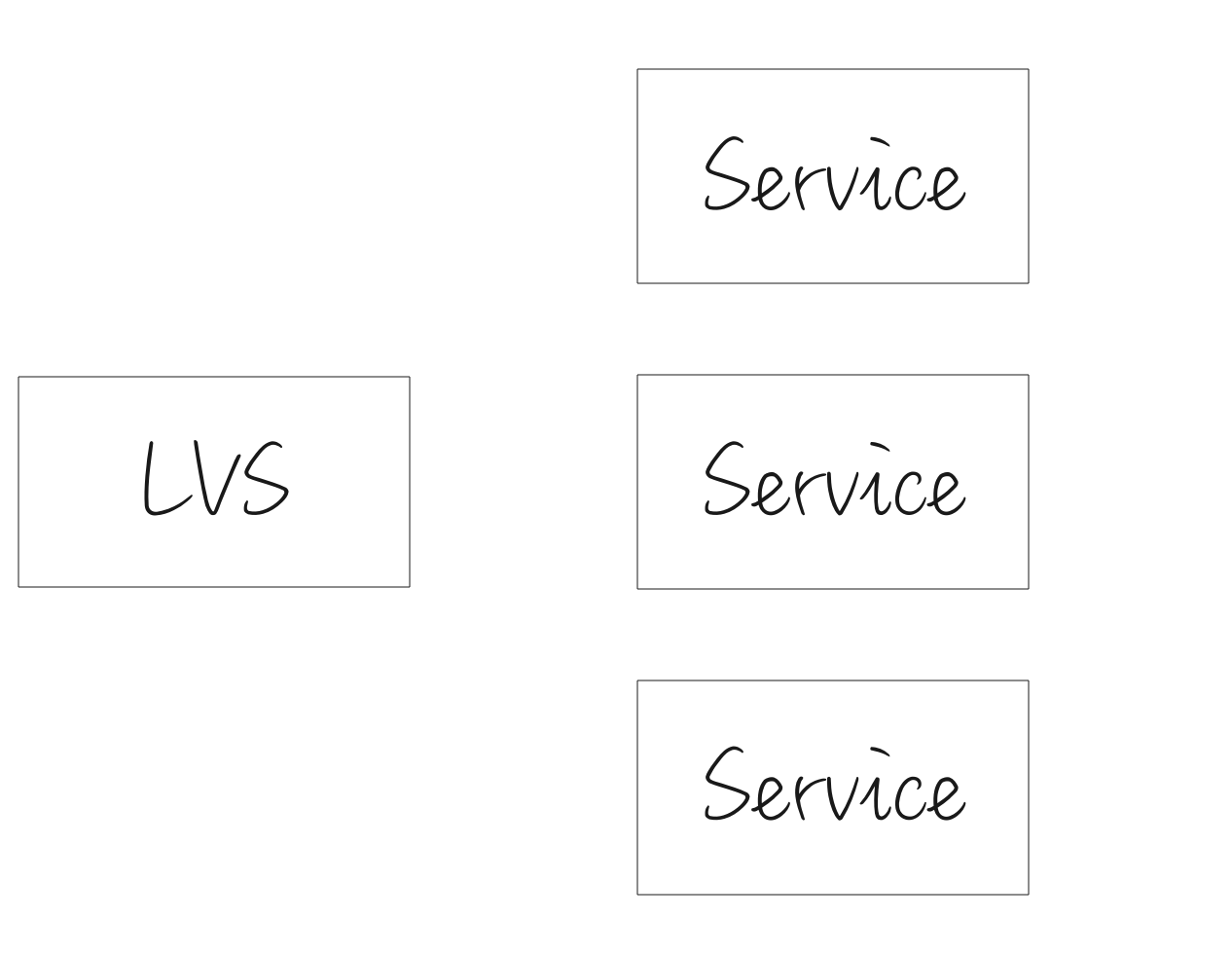
在ipvs中,最小连接算法是一种负载均衡算法,常见的还有轮询算法,加权轮询算法等。让我们先做个基本的假设,每个UDP会话连接上的请求量大概一致。让LB无需观测后端服务的状态,仅仅根据会话信息,做出转发到哪个后端Service的判断,事实上,lvs也目前不能根据后端服务的cpu、内存或者是其他信息做出判断。直观上来说,最小连接数很符合大家的直观感受,保证了每个工作负载上承受的业务连接数是最少的。

ipvs-lb-udp

但是,在LVS保留会话时间稍微较长的情况下,最小连接算法在扩容、升级(升级前后IP改变)、重启(重启前后IP改变)会有一些问题。

简而言之,就是LVS向后端转发UDP消息的时候,后端服务没有很好的拒绝手段,在LC模式下,导致LVS可能转发给后端服务,超过它处理能力的消息数,等到这些会话老化之后,LVS又开始转发给后端服务,超过它处理能力的消息数,如此反复,始终造成大量消息呼损,极难自愈

详细数据推导

以扩容为例,设

  • 每秒消息量 m
  • 保活时间 t
  • 旧的节点数 a
  • 新增节点数 b
  • 使用新IP的请求占比 c (0<c<1)
  • 在一段保活时间内的IP总数 d
  • 单节点处理能力为x

那么,扩容时刻,老的节点上的会话数是d/a

扩容的时候,由于老的节点存在mt/a的会话,那么新IP上来的请求都会转发向新节点,直到把新节点的连接数冲到mt/a为止,

新节点接收请求的速率: (m * c)/b
新节点连接数和老节点持平的时间点: **(d * b)/(m * c a)*

如果新节点连接数和老节点持平的时间点远远小于保活时间,这就会有问题。其他节点上的会话都是相对离散的,所以在保活时间t内,一直不断有消息进来,但新的节点一瞬间接收到了大量请求,又会在同一时间老化。在下一个周期t,又接收到大量请求,如此反复,极难自愈。这也因为lvs的udp转发不关心后端服务器是否成功处理报文,只要转发过去就算了。就是lvs无视后端的状态转发,相比tcp,至少还有是否接收tck连接,后端主动拆链等手段。

虽然LVS能限制后端服务器的连接数,但连接数限制在这个场景是不起作用的。如果您的服务满足上述的这个模式,还是建议您修改为rr算法更为适合。

Entry Log File

背景

测试环境上出现了一些entryLog解析异常的问题,想分析一下磁盘上.log文件的格式,分析分析我们的文件是否有问题

解析代码地址

https://github.com/protocol-laboratory/bookkeeper-codec-java/blob/main/src/main/java/com/github/protocol/EntryLogReader.java

正文

我们采用的配置是singleEntryLog模式,就是说很多ledger的信息都会放在一个log文件内部。

插一句话:这种log文件,其实和LSM相似,属于不可变的数据结构,这种数据结构,得益于不可变,所以内容可以安排的非常紧凑,不像B树结构,需要预留一定空间给原地更新,随机插入等。

bookkeeper-entry-log-format

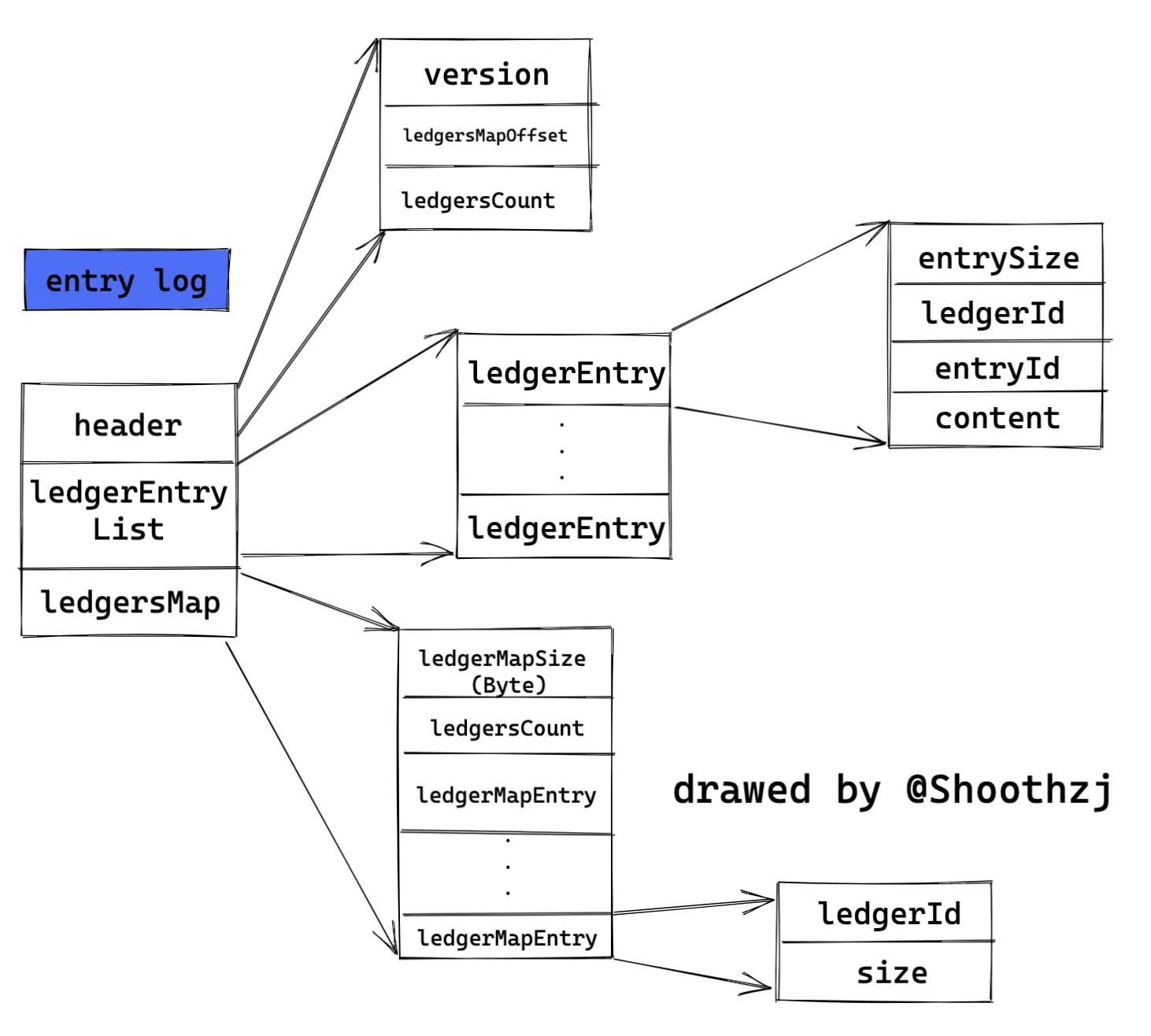
如上图所示,接下来,我们沿着解析的流程,解读每个部分的详细格式

解析头部

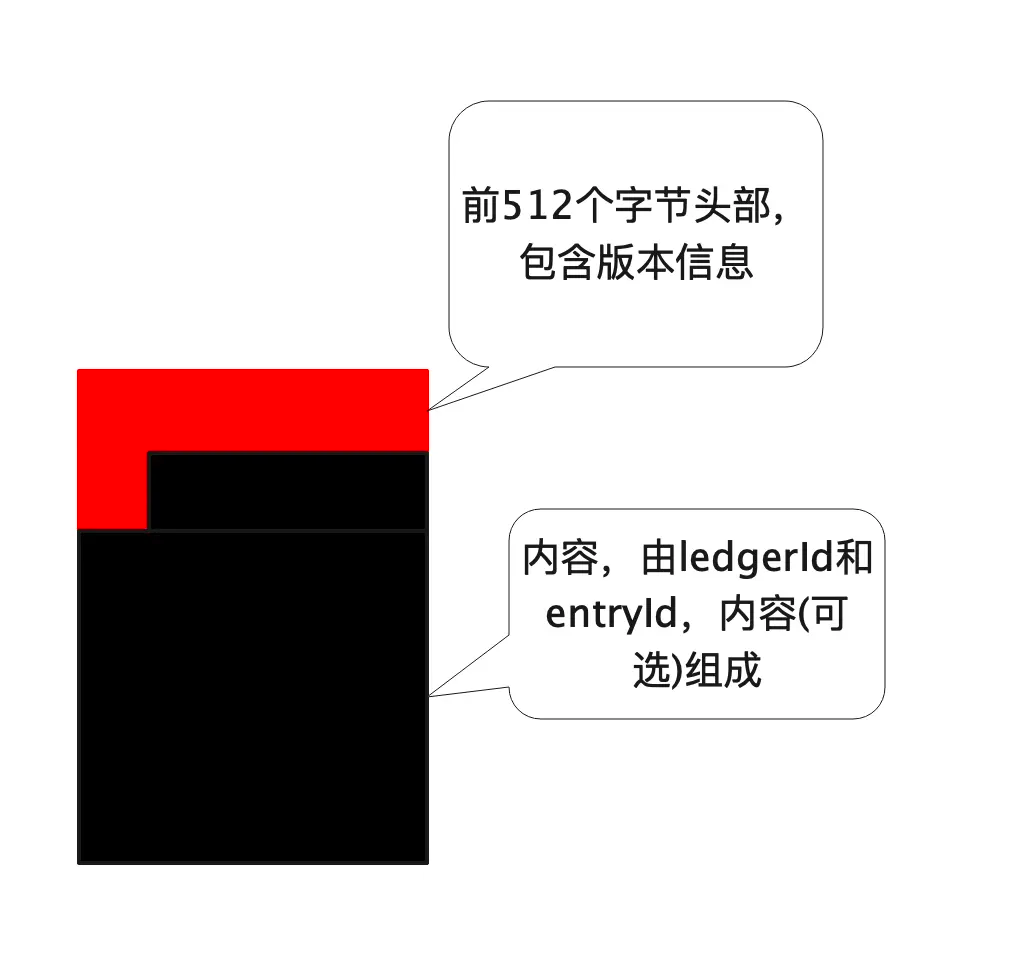
首先,我们解析文件的头部字段,bookkeeper的设计中,文件头部预留了1024字节,目前只使用了20个字节
前四个字节是BKLO的文件魔数
然后紧跟着的4个字节是bk文件的版本号,这里我们仅分析版本号1
然后8字节的long类型代表ledgersMap的开始位置,称为ledgersMapOffset
然后4字节的int类型代表ledgersMap的总长度。

解析ledgerMap部分

最前面四个字节,代表这部分的大小

然后开始的ledgerId和entryId分别为-1,-2,随后是一个ledger的count大小,后面的ledgerId和size才是有效值

随后的部分非常紧凑,由一个个ledgerId,size组成

读取完ledgerMap,可以知道,这个文件包含了多少ledger,总大小是多少?

注:size代表这一段ledger占用的磁盘空间大小

解析body内容

body内容也非常紧凑.
最前面4个字节,代表这个entry的大小。
然后8个字节,ledgerId
然后8个字节,entryId
剩下的内容,就是pulsar写数据的编码,不再属于bookkeeper的格式范畴了

Txn Log File

解析代码地址

https://github.com/protocol-laboratory/bookkeeper-codec-java/blob/main/src/main/java/com/github/protocol/TxnLogReader.java

简述

bookkeeper中的journal log,和大部分基于LSM的数据结构一样,是用来保证文件一定被写入的。会在数据写入的时候,写入journal log,崩溃恢复的时候从journal log里面恢复。

bookkeeper-txn-log-format

解析头部

首先,我们解析文件的头部字段
前四个字节是BKLG的文件魔数
然后紧跟着的4个字节是bk文件的版本号

1
2
3
4
5
6
7
8
9
private TxnHeader readHeader(FileChannel fileChannel) throws Exception {
final ByteBuf headers = Unpooled.buffer(HEADER_SIZE);
final int read = fileChannel.read(headers.internalNioBuffer( index: 0, HEADER_SIZE));
headers.writerIndex(read);
final byte[] bklgByte = new byte[4];
headers.readBytes(bklgByte, dstIndex: 0, length: 4);
final int headerVersion = headers.readInt();
return new TxnHeader(headerVersion);
}

解析内容

内容非常紧凑,由ledgerId,entryId和内容组成。ledgerId一定大于0,entryId在小于0的情况下代表特殊的数据。如

  • -0x1000即4096 代表ledger的masterKey
  • -0x2000即8192 代表ledger是否被fence
  • -0x4000即16384 代表ledger的force
  • -0x8000即32768 代表ledger的显示LAC

回放流程

当bookkeeper启动的时候,他会从data路径下取得lastMark文件,该文件一定为16个字节,前八个字节代表落盘的最新journal log文件,后八个字节代表文件的位置。会从这个位置开始回放。
值得一提的是,lastId文件,代表下一个dataLog该使用什么文件名。

前言

读《数据库系统内幕》有感,个人感觉分槽页是个很难理解的概念,也是很实用的知识。

正文

原始的B树论文描述了一种简单的,用于定长数据的页组织方式:

image-20210214170013416

这种页有这样两个缺点

  • 除非往最右侧插入数据,否则需要移动前面的数据
  • 无法有效地管理变长地字段

所以这里自然而然地思考,因为要存储变长的数据。

变长的数据需要回收。

回收完的数据需要移动。

但是对外的偏移量不能变,这个变动会非常麻烦,至少聚簇索引需要变动,根据实现不同,甚至二级索引也要跟着更新

我们的需求是

  • 最小开销存储变长记录
  • 回收已删除记录占用地空间
  • 引用页中地记录,无论记录在哪

image-20210214165732666

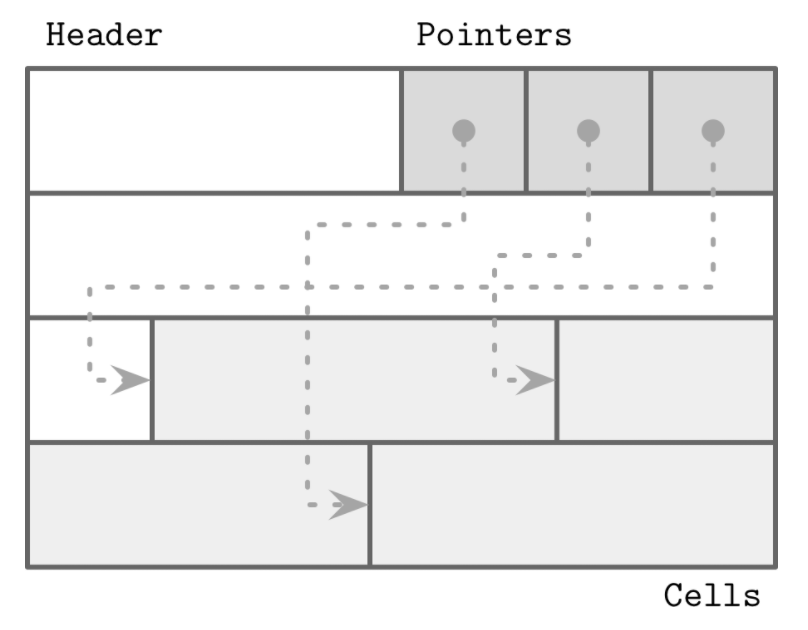
分槽页通过加了一层结构,页外指针的引用都通过前面的指针引用,包括二分查找也通过前面的指针引用,来解决这个问题。如果不涉及页的变动,一切变化都在分槽页内完成。

分槽页如何解决上述问题:

  • 最小开销:分槽页唯一的额外开销是一个指针数组,用于保存记录实际所在位置的偏移量
  • 空间回收:通过对页进行碎片整理和重写,就可以回收空间
  • 动态布局:从页外部,只能通过槽ID来引用槽,而确切的位置是由页内部决定的

前言

基于k8s部署的微服务,健康检查已经成为其中非常重要的一环,无论是k8s自带的域名负载均衡,或是istio的负载均衡。都把健康检查(即Readiness)是否通过看为是微服务是否正常的标志。

如果正常,才会给应用程序转发报文请求。反之,则不会转发请求

即就是,在微服务功能正常的时候,健康检查返回正常,当微服务进程异常的时候,健康检查返回异常。

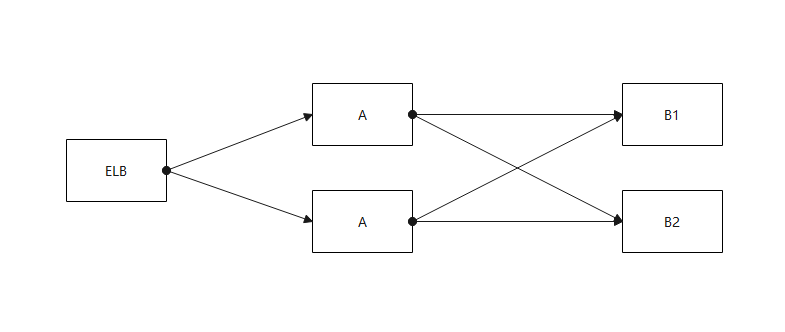
假设的数据流向

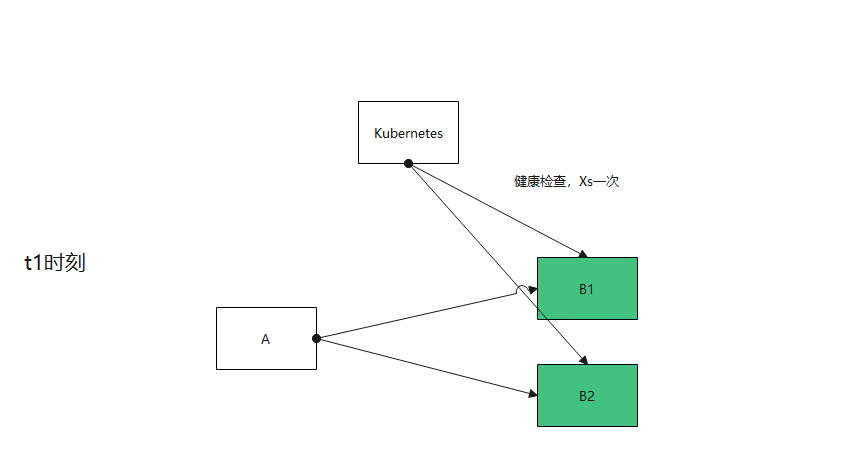
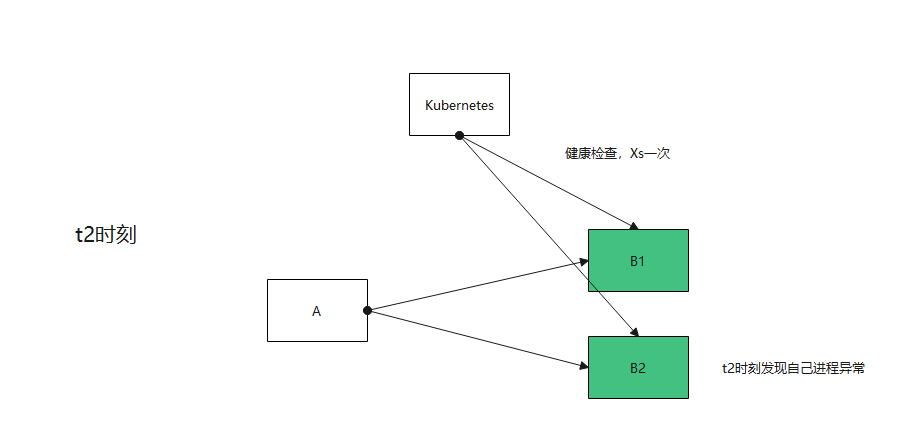
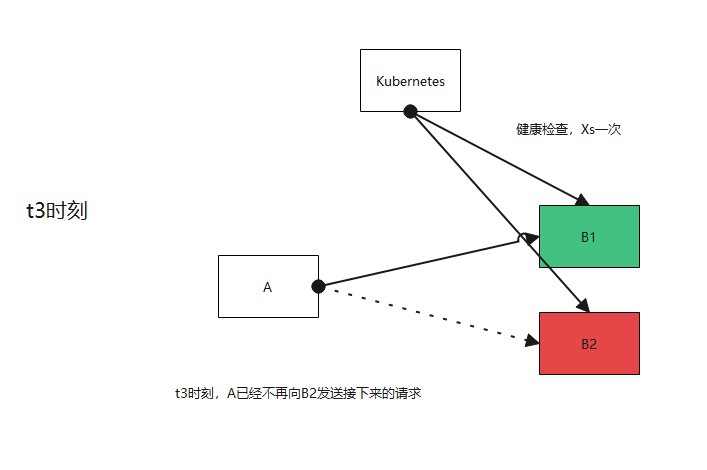
及时地让上游的服务/网关不转发给你。这里自然反应做不到及时,立刻的反应(健康检查是定期间隔探测,探测的周期在k8s
yaml中配置),如果要达到整个系统无失败,是要依赖一定程度的重试机制,如下图流程所示

image-20210115130302091

image-20210115133626133

image-20210115133655090

如果服务有多个功能,一个好使,一个不好使怎么办?

这种健康检查自检无法通过,一般是系统依赖的某个资源不好使了,如数据库无法写入,消息中间件无法写入等,抑或是进程死锁等进程内部的故障。以上图的微服务B1举例,假如同时运行着tomcat和kafka生产者,那么也许当tomcat挂掉的时候,他的
kafka生产者还能正常运行。这个时候,可能有一些业务是不重要的,可以在异常的时候失败。比如元数据的创建、新用户的开户等。

这里健康检查的结果就可以以核心功能是否正常为准,次级功能通过上报告警
的方式及时处理。并且,除了一些网关模块,成熟的微服务框架都有熔断的功能,可以保证调用B1实例次级功能失败太多,后面都向B2实例调用。

如果我的两个功能都是核心功能怎么办

我觉得这里有三种方式可以探讨一下

健康检查做到接口级别

把健康检查做到接口级别,调用方根据你的接口级别的状态是否ok,决定是否调用这个实例

优点 :健康检查做到接口级别,不出错,可以应对任何多个功能依赖不同资源的场景。

缺点 :健康检查复杂,几乎很难有开源组件支持,基本上要自研

健康检查依旧通过,上游通过熔断处理功能故障

健康检查依旧通过,故障通过上报告警的方式及时处理,一些业务的呼损通过熔断机制解决。

不过,大部分的4层ELB都不支持熔断,Nginx也支持的有限,如果我们的服务挂在4层ELB,7层ELB的后面,就无法通过熔断机制搞定业务呼损的问题

健康检查不通过,上游可以放通

健康检查不通过,但是上游如果发现下游所有的实例都处于不健康状态,这种情况下,把他们当作健康状态处理,试一试能否发通。像servicecomb这个微服务框架就支持这个特性,但
istio还不支持。

总结

  • 最好还是能做到一个微服务只有一个核心功能。
  • 当你的服务挂在ELB、Nginx、K8sService、Istio的后端时,就把他定位成网关服务,核心功能单一,接收请求向下游转发,健康检查准确可靠(LB几乎无熔断能力)
  • 如果服务处于架构的内侧,只有一个核心功能,其他功能在异常场景下可失败,健康检查的结果就以核心功能是否正常为准
  • 如果服务处于架构的内侧,并且有两个核心功能。如服务B1,在上游有熔断的情况下,三种方式均可
  • 如果服务处于架构的外侧,并且有两个核心功能。只能通过报告警的方式

Step1 加入SpringWeb的依赖

1
2
3
4
5
6
7
<!-- spring 依赖 -->
<dependency>
<groupId>org.springframework</groupId>
<artifactId>spring-core</artifactId>
<version>5.2.9.RELEASE</version>
<scope>provided</scope>
</dependency>

Step2 书写一个RestController

1
2
3
4
5
6
7
8
9
10
11
12
13
14
15
16
17
18
19
20
21
22
23
24
25
26
27
28
29
30
31
32
33
34
35
36
package com.github.hezhangjian.demo.agent.test.controller;

import com.github.hezhangjian.demo.agent.test.module.rest.CreateJobReqDto;
import com.github.hezhangjian.demo.agent.test.module.rest.CreateJobRespDto;
import lombok.extern.slf4j.Slf4j;
import org.springframework.http.HttpStatus;
import org.springframework.http.ResponseEntity;
import org.springframework.web.bind.annotation.PathVariable;
import org.springframework.web.bind.annotation.PutMapping;
import org.springframework.web.bind.annotation.RequestBody;
import org.springframework.web.bind.annotation.RestController;

/**
* @author hezhangjian
*/
@Slf4j
@RestController
public class TestController {

/**
* @param jobId
* @param createJobReqDto
* https://docs.aws.amazon.com/iot/latest/apireference/API_CreateJob.html
* curl -X PUT -H 'Content-Type: application/json' 127.0.0.1:8080/jobs/111 -d '{"description":"description"}' -iv
* @return
*/
@PutMapping(path = "/jobs/{jobId}")
public ResponseEntity<CreateJobRespDto> createJob(@PathVariable("jobId") String jobId, @RequestBody CreateJobReqDto createJobReqDto) {
final CreateJobRespDto jobRespDto = new CreateJobRespDto();
createJobReqDto.setDescription("description");
createJobReqDto.setDocument("document");
return new ResponseEntity<>(jobRespDto, HttpStatus.CREATED);
}

}

ReqDto:

1
2
3
4
5
6
7
8
9
10
11
12
13
14
15
16
17
18
19
package com.github.hezhangjian.demo.agent.test.module.rest;

import lombok.Data;

/**
* @author hezhangjian
*/
@Data
public class CreateJobReqDto {

private String description;

private String document;

public CreateJobReqDto() {
}

}

RespDto:

1
2
3
4
5
6
7
8
9
10
11
12
13
14
15
16
17
18
19
20
21
package com.github.hezhangjian.demo.agent.test.module.rest;

import lombok.Data;

/**
* https://docs.aws.amazon.com/iot/latest/apireference/API_CreateJob.html
* @author hezhangjian
*/
@Data
public class CreateJobRespDto {

private String description;

private String jobArn;

private String jobId;

public CreateJobRespDto() {
}
}

Step3 在AgentTransformer中织入切面的逻辑

1
2
3
4
5
6
7
8
9
10
11
12
13
14
15
16
17
18
19
20
21
22
23
24
25
26
27
28
29
30
31
32
33
34
35
36
37
38
39
40
41
42
43
44
45
46
package com.github.hezhangjian.demo.agent;

import com.github.hezhangjian.demo.agent.interceptor.RestControllerInterceptor;
import net.bytebuddy.agent.builder.AgentBuilder;
import net.bytebuddy.asm.Advice;
import net.bytebuddy.description.type.TypeDescription;
import net.bytebuddy.dynamic.DynamicType;
import net.bytebuddy.matcher.ElementMatchers;
import net.bytebuddy.utility.JavaModule;
import org.slf4j.Logger;
import org.slf4j.LoggerFactory;
import org.springframework.web.bind.annotation.DeleteMapping;
import org.springframework.web.bind.annotation.GetMapping;
import org.springframework.web.bind.annotation.PatchMapping;
import org.springframework.web.bind.annotation.PostMapping;
import org.springframework.web.bind.annotation.PutMapping;
import org.springframework.web.bind.annotation.RequestMapping;

/**
* @author hezhangjian
*/
public class AgentTransformer implements AgentBuilder.Transformer {

private static final Logger log = LoggerFactory.getLogger(AgentTransformer.class);

@Override
public DynamicType.Builder<?> transform(DynamicType.Builder<?> builder, TypeDescription typeDescription, ClassLoader classLoader, JavaModule javaModule) {
try {
//包名放在com.github.hezhangjian.demo.agent.test.controller下视为controller代码
if (typeDescription.getTypeName().startsWith("com.github.hezhangjian.demo.agent.test.controller")) {
final Advice advice = Advice.to(RestControllerInterceptor.class);
return builder.visit(advice
.on(ElementMatchers.isAnnotatedWith(RequestMapping.class)
.or(ElementMatchers.isAnnotatedWith(GetMapping.class))
.or(ElementMatchers.isAnnotatedWith(PostMapping.class))
.or(ElementMatchers.isAnnotatedWith(PutMapping.class))
.or(ElementMatchers.isAnnotatedWith(DeleteMapping.class))
.or(ElementMatchers.isAnnotatedWith(PatchMapping.class))));
}
} catch (Exception e) {
log.error("error is ", e);
}
return builder;
}

}

Step4 先添加一个打印日志工具类

Interceptor中不能出现和controller一样的字段,我们先写一个工具类用来agent打印日志

1
2
3
4
5
6
7
8
9
10
11
12
13
14
15
16
17
18
19
20
21
22
23
24
25
26
27
28
29
30
31
32
33
34
35
36
37
38
39
40
41
42
43
44
45
46
47
48
49
50
51
52
53
54
55
56
57
58
59
60
61
62
63
64
65
66
67
68
69
70
71
72
73
74
75
76
77
78
79
80
81
82
83
84
85
86
87
88
89
90
91
92
93
94
95
96
97
98
99
100
101
102
103
104
105
106
107
108
109
110
111
112
113
114
115
116
117
118
119
120
121
122
123
124
125
126
127
128
129
130
131
132
133
134
135
136
137
138
139
140
141
142
143
144
145
146
147
148
149
150
151
152
153
154
155
156
157
158
159
160
161
162
163
164
165
166
167
168
169
170
171
172
173
174
175
176
177
178
179
180
181
182
183
184
185
186
187
188
189
190
191
192
193
194
195
196
197
198
199
200
201
202
203
204
205
206
207
208
209
210
211
212
213
214
215
216
217
218
219
220
221
222
223
224
225
226
227
228
229
230
231
232
233
234
235
236
237
238
239
240
241
242
243
244
245
246
247
248
249
250
251
252
253
254
255
256
257
258
259
260
261
262
263
264
265
266
267
268
269
270
271
272
273
274
275
276
277
278
279
280
281
282
283
284
285
286
287
288
289
290
291
292
293
294
295
296
297
298
299
300
301
302
303
304
305
306
307
308
309
310
311
312
313
314
315
316
317
318
319
320
321
322
323
324
325
326
327
328
329
package com.github.hezhangjian.demo.agent.util;

import org.slf4j.Logger;
import org.slf4j.LoggerFactory;
import org.slf4j.Marker;

/**
* @author hezhangjian
*/
public class AgentUtil {

private static final Logger log = LoggerFactory.getLogger(AgentUtil.class);

/**
* Log a message at the TRACE level.
*
* @param msg the message string to be logged
*/
public static void trace(String msg) {
log.trace(msg);
}

/**
* Log a message at the TRACE level according to the specified format
* and argument.
* <p/>
* <p>This form avoids superfluous object creation when the logger
* is disabled for the TRACE level. </p>
*
* @param format the format string
* @param arg the argument
*/
public static void trace(String format, Object arg) {
log.trace(format, arg);
}

/**
* Log a message at the TRACE level according to the specified format
* and arguments.
* <p/>
* <p>This form avoids superfluous object creation when the logger
* is disabled for the TRACE level. </p>
*
* @param format the format string
* @param arg1 the first argument
* @param arg2 the second argument
*/
public static void trace(String format, Object arg1, Object arg2) {
log.trace(format, arg1, arg2);
}

/**
* Log a message at the TRACE level according to the specified format
* and arguments.
* <p/>
* <p>This form avoids superfluous string concatenation when the logger
* is disabled for the TRACE level. However, this variant incurs the hidden
* (and relatively small) cost of creating an <code>Object[]</code> before invoking the method,
* even if this logger is disabled for TRACE. The variants taking {@link #trace(String, Object) one} and
* {@link #trace(String, Object, Object) two} arguments exist solely in order to avoid this hidden cost.</p>
*
* @param format the format string
* @param arguments a list of 3 or more arguments
*/
public static void trace(String format, Object... arguments) {
log.trace(format, arguments);
}

/**
* Log an exception (throwable) at the TRACE level with an
* accompanying message.
*
* @param msg the message accompanying the exception
* @param t the exception (throwable) to log
*/
public static void trace(String msg, Throwable t) {
log.trace(msg, t);
}

/**
* Log a message at the DEBUG level.
*
* @param msg the message string to be logged
*/
public static void debug(String msg) {
}

/**
* Log a message at the DEBUG level according to the specified format
* and argument.
* <p/>
* <p>This form avoids superfluous object creation when the logger
* is disabled for the DEBUG level. </p>
*
* @param format the format string
* @param arg the argument
*/
public static void debug(String format, Object arg) {
}

/**
* Log a message at the DEBUG level according to the specified format
* and arguments.
* <p/>
* <p>This form avoids superfluous object creation when the logger
* is disabled for the DEBUG level. </p>
*
* @param format the format string
* @param arg1 the first argument
* @param arg2 the second argument
*/
public static void debug(String format, Object arg1, Object arg2) {
}

/**
* Log a message at the DEBUG level according to the specified format
* and arguments.
* <p/>
* <p>This form avoids superfluous string concatenation when the logger
* is disabled for the DEBUG level. However, this variant incurs the hidden
* (and relatively small) cost of creating an <code>Object[]</code> before invoking the method,
* even if this logger is disabled for DEBUG. The variants taking
* {@link #debug(String, Object) one} and {@link #debug(String, Object, Object) two}
* arguments exist solely in order to avoid this hidden cost.</p>
*
* @param format the format string
* @param arguments a list of 3 or more arguments
*/
public static void debug(String format, Object... arguments) {
}

/**
* Log an exception (throwable) at the DEBUG level with an
* accompanying message.
*
* @param msg the message accompanying the exception
* @param t the exception (throwable) to log
*/
public static void debug(String msg, Throwable t) {
}

/**
* Log a message at the INFO level.
*
* @param msg the message string to be logged
*/
public static void info(String msg) {
}

/**
* Log a message at the INFO level according to the specified format
* and argument.
* <p/>
* <p>This form avoids superfluous object creation when the logger
* is disabled for the INFO level. </p>
*
* @param format the format string
* @param arg the argument
*/
public static void info(String format, Object arg) {
}

/**
* Log a message at the INFO level according to the specified format
* and arguments.
* <p/>
* <p>This form avoids superfluous object creation when the logger
* is disabled for the INFO level. </p>
*
* @param format the format string
* @param arg1 the first argument
* @param arg2 the second argument
*/
public static void info(String format, Object arg1, Object arg2) {
}

/**
* Log a message at the INFO level according to the specified format
* and arguments.
* <p/>
* <p>This form avoids superfluous string concatenation when the logger
* is disabled for the INFO level. However, this variant incurs the hidden
* (and relatively small) cost of creating an <code>Object[]</code> before invoking the method,
* even if this logger is disabled for INFO. The variants taking
* {@link #info(String, Object) one} and {@link #info(String, Object, Object) two}
* arguments exist solely in order to avoid this hidden cost.</p>
*
* @param format the format string
* @param arguments a list of 3 or more arguments
*/
public static void info(String format, Object... arguments) {
}

/**
* Log an exception (throwable) at the INFO level with an
* accompanying message.
*
* @param msg the message accompanying the exception
* @param t the exception (throwable) to log
*/
public static void info(String msg, Throwable t) {
}

/**
* Log a message at the WARN level.
*
* @param msg the message string to be logged
*/
public static void warn(String msg) {
}

/**
* Log a message at the WARN level according to the specified format
* and argument.
* <p/>
* <p>This form avoids superfluous object creation when the logger
* is disabled for the WARN level. </p>
*
* @param format the format string
* @param arg the argument
*/
public static void warn(String format, Object arg) {
}

/**
* Log a message at the WARN level according to the specified format
* and arguments.
* <p/>
* <p>This form avoids superfluous string concatenation when the logger
* is disabled for the WARN level. However, this variant incurs the hidden
* (and relatively small) cost of creating an <code>Object[]</code> before invoking the method,
* even if this logger is disabled for WARN. The variants taking
* {@link #warn(String, Object) one} and {@link #warn(String, Object, Object) two}
* arguments exist solely in order to avoid this hidden cost.</p>
*
* @param format the format string
* @param arguments a list of 3 or more arguments
*/
public static void warn(String format, Object... arguments) {
}

/**
* Log a message at the WARN level according to the specified format
* and arguments.
* <p/>
* <p>This form avoids superfluous object creation when the logger
* is disabled for the WARN level. </p>
*
* @param format the format string
* @param arg1 the first argument
* @param arg2 the second argument
*/
public static void warn(String format, Object arg1, Object arg2) {
}

/**
* Log an exception (throwable) at the WARN level with an
* accompanying message.
*
* @param msg the message accompanying the exception
* @param t the exception (throwable) to log
*/
public static void warn(String msg, Throwable t) {
}

/**
* Log a message at the ERROR level.
*
* @param msg the message string to be logged
*/
public static void error(String msg) {
}

/**
* Log a message at the ERROR level according to the specified format
* and argument.
* <p/>
* <p>This form avoids superfluous object creation when the logger
* is disabled for the ERROR level. </p>
*
* @param format the format string
* @param arg the argument
*/
public static void error(String format, Object arg) {
}

/**
* Log a message at the ERROR level according to the specified format
* and arguments.
* <p/>
* <p>This form avoids superfluous object creation when the logger
* is disabled for the ERROR level. </p>
*
* @param format the format string
* @param arg1 the first argument
* @param arg2 the second argument
*/
public static void error(String format, Object arg1, Object arg2) {
}

/**
* Log a message at the ERROR level according to the specified format
* and arguments.
* <p/>
* <p>This form avoids superfluous string concatenation when the logger
* is disabled for the ERROR level. However, this variant incurs the hidden
* (and relatively small) cost of creating an <code>Object[]</code> before invoking the method,
* even if this logger is disabled for ERROR. The variants taking
* {@link #error(String, Object) one} and {@link #error(String, Object, Object) two}
* arguments exist solely in order to avoid this hidden cost.</p>
*
* @param format the format string
* @param arguments a list of 3 or more arguments
*/
public static void error(String format, Object... arguments) {
}

/**
* Log an exception (throwable) at the ERROR level with an
* accompanying message.
*
* @param msg the message accompanying the exception
* @param t the exception (throwable) to log
*/
public static void error(String msg, Throwable t) {
}

}

Step5 书写Interceptor切入方法

1
2
3
4
5
6
7
8
9
10
11
12
13
14
15
16
17
18
19
20
21
22
23
24
25
26
27
28
29
30
31
32
33
34
35
36
37
38
39
40
41
42
43
44
45
46
47
48
49
50
51
52
53
54
55
package com.github.hezhangjian.demo.agent.interceptor;

import com.fasterxml.jackson.databind.node.ArrayNode;
import com.fasterxml.jackson.databind.node.ObjectNode;
import com.github.hezhangjian.demo.agent.util.AgentJacksonUtil;
import com.github.hezhangjian.demo.agent.util.AgentUtil;
import net.bytebuddy.asm.Advice;
import org.springframework.http.ResponseEntity;

import java.lang.reflect.Method;

/**
* @author hezhangjian
*/
public class RestControllerInterceptor {

private static final ThreadLocal<Long> costThreadLocal = new ThreadLocal<>();

/**
* #t Class名 ex: com.github.hezhangjian.demo.agent.test.controller.TestController
* #m Method名 ex: createJob
* #d Method描述 ex: (Ljava/lang/String;Lcom/github/hezhangjian/demo/agent/test/module/rest/CreateJobReqDto;)Lorg/springframework/http/ResponseEntity;
* #s 方法签名 ex: (java.lang.String,com.github.hezhangjian.demo.agent.test.module.rest.CreateJobReqDto)
* #r 返回类型 ex: org.springframework.http.ResponseEntity
*
* @param signature
*/
@Advice.OnMethodEnter
public static void enter(@Advice.Origin("#t #m") String signature) {
AgentUtil.info("[{}]", signature);
}

/**
* @param method 方法名
* @param args
* @param result
* @param thrown
*/
@SuppressWarnings("rawtypes")
@Advice.OnMethodExit(onThrowable = Throwable.class)
public static void exit(@Advice.Origin Method method, @Advice.AllArguments Object[] args,
@Advice.Return Object result, @Advice.Thrown Throwable thrown) {
AgentUtil.debug("method is [{}]", method);
final ArrayNode arrayNode = AgentJacksonUtil.createArrayNode();
for (Object arg : args) {
arrayNode.add(AgentJacksonUtil.toJson(arg));
}
final ObjectNode objectNode = AgentJacksonUtil.createObjectNode();
objectNode.set("args", arrayNode);
ResponseEntity responseEntity = (ResponseEntity) result;
AgentUtil.info("status code is [{}] args is [{}] result is [{}]", responseEntity.getStatusCode(), objectNode, responseEntity.getBody());
}


}

curl命令调用查看效果

1
2
2020-12-31,17:52:01,528+08:00(6121):INFO{}[http-nio-8080-exec-1#39]com.github.hezhangjian.demo.agent.util.AgentUtil.info(AgentUtil.java:167)-->[com.github.hezhangjian.demo.agent.test.controller.TestController createJob]
2020-12-31,17:52:01,544+08:00(6137):INFO{}[http-nio-8080-exec-1#39]com.github.hezhangjian.demo.agent.util.AgentUtil.info(AgentUtil.java:200)-->status code is [201 CREATED] args is [{"args":["\"111\"","{\"description\":\"description\",\"document\":\"document\"}"]}] result is [CreateJobRespDto(description=null, jobArn=null, jobId=null)]

创建一个java maven工程

Step1 添加bytebuddy及日志依赖

1
2
3
4
5
6
7
8
9
10
11
12
13
14
15
16
17
18
19
20
21
22
<dependencies>
<dependency>
<groupId>org.springframework</groupId>
<artifactId>spring-web</artifactId>
<version>5.2.9.RELEASE</version>
<scope>provided</scope>
</dependency>

<!-- 字节码 注入 -->
<dependency>
<groupId>net.bytebuddy</groupId>
<artifactId>byte-buddy</artifactId>
<version>1.10.19</version>
</dependency>

<dependency>
<groupId>org.slf4j</groupId>
<artifactId>slf4j-api</artifactId>
<version>1.7.30</version>
<scope>provided</scope>
</dependency>
</dependencies>

Step2 书写Agent的入口处

agent有两个入口函数,分别是premain和agentmain,用于两种启动场景-javaagent启动场景和attach启动场景,我们这里先书写-javaagent启动场景

1
2
3
4
5
6
7
8
9
10
11
12
13
14
15
16
17
18
19
20
21
22
23
24
25
26
27
28
29
30
31
32
33
34
35
36
37
38
39
40
41
42
43
44
45
46
47
48
49
package com.github.hezhangjian.demo.agent;

import net.bytebuddy.ByteBuddy;
import net.bytebuddy.agent.builder.AgentBuilder;
import net.bytebuddy.matcher.ElementMatchers;
import org.slf4j.Logger;
import org.slf4j.LoggerFactory;

import java.lang.instrument.Instrumentation;

import static net.bytebuddy.matcher.ElementMatchers.nameStartsWith;

/**
* @author hezhangjian
*/
public class AgentMain {

private static final Logger log = LoggerFactory.getLogger(AgentMain.class);

/**
* call on -javaagnet
* @param agentArgs
* @param inst
*/
public static void premain(String agentArgs, Instrumentation inst) {
System.out.println("start agent premain");
final ByteBuddy byteBuddy = new ByteBuddy();
new AgentBuilder.Default(byteBuddy)
//这些类都是常见的无需切面注入的类,忽略掉可以提升agent加载速度
.ignore(nameStartsWith("net.bytebuddy.")
.or(nameStartsWith("org.slf4j.")
.or(nameStartsWith("org.apache.logging.")
.or(nameStartsWith("org.groovy."))
.or(nameStartsWith("javassist"))
.or(nameStartsWith(".asm."))
.or(nameStartsWith("sun.reflect"))
.or(ElementMatchers.isSynthetic()))))
//你想切面的包名
.type(ElementMatchers.nameStartsWith("com.github.hezhangjian.agent.test"))
.transform(new AgentTransformer())
.with(AgentBuilder.RedefinitionStrategy.RETRANSFORMATION)
.installOn(inst);
}

public static void agentmain(String agentArgs, Instrumentation inst) {
System.out.println("start agent main");
}

}

这个时候Transform先书写一个空实现

1
2
3
4
5
6
7
8
9
10
11
12
13
14
15
16
17
18
19
package com.github.hezhangjian.demo.agent;

import net.bytebuddy.agent.builder.AgentBuilder;
import net.bytebuddy.description.type.TypeDescription;
import net.bytebuddy.dynamic.DynamicType;
import net.bytebuddy.utility.JavaModule;

/**
* @author hezhangjian
*/
public class AgentTransformer implements AgentBuilder.Transformer{

@Override
public DynamicType.Builder<?> transform(DynamicType.Builder<?> builder, TypeDescription typeDescription, ClassLoader classLoader, JavaModule javaModule) {
return builder;
}

}

Step3 maven pom文件配置打包

1
2
3
4
5
6
7
8
9
10
11
12
13
14
15
16
17
18
19
20
21
22
23
24
25
26
27
28
29
30
31
32
33
34
35
36
37
38
39
40
41
42
43
44
45
46
47
48
49
50
51
52
53
54
55
56
57
<build>
<plugins>
<plugin>
<groupId>org.apache.maven.plugins</groupId>
<artifactId>maven-shade-plugin</artifactId>
<version>3.2.4</version>
<executions>
<execution>
<phase>package</phase>
<goals>
<goal>shade</goal>
</goals>
<configuration>
<transformers>
<transformer implementation="org.apache.maven.plugins.shade.resource.ManifestResourceTransformer">
<manifestEntries>
<Premain-Class>com.github.hezhangjian.demo.agent.AgentMain</Premain-Class>
<Can-Redefine-Classes>true</Can-Redefine-Classes>
<Can-Retransform-Classes>true</Can-Retransform-Classes>
</manifestEntries>
</transformer>
</transformers>
<artifactSet>
<includes>
<include>org.slf4j:slf4j-api</include>
<include>org.apache.logging.log4j:log4j-api</include>
<include>org.apache.logging.log4j:log4j-core</include>
<include>org.apache.logging.log4j:log4j-slf4j-impl</include>
<include>org.apache.logging.log4j:log4j-jcl</include>
</includes>
</artifactSet>
<filters>
<filter>
<artifact>*:*</artifact>
<excludes>
<exclude>META-INF/*.SF</exclude>
<exclude>META-INF/*.DSA</exclude>
<exclude>META-INF/*.RSA</exclude>
</excludes>
</filter>
</filters>
<relocations>
<relocation>
<pattern>org.slf4j</pattern>
<shadedPattern>com.github.hezhangjian.org.slf4j</shadedPattern>
</relocation>
<relocation>
<pattern>org.apache.logging</pattern>
<shadedPattern>com.github.hezhangjian.org.apache.logging</shadedPattern>
</relocation>
</relocations>
</configuration>
</execution>
</executions>
</plugin>
</plugins>
</build>

这里配置了打java agent的包,和打shade包规避类冲突的问题,关于打shade包,可以参考https://www.jianshu.com/p/8171607ce03f

创建一个测试SpringBoot工程

Step1 书写主函数

1
2
3
4
5
6
7
8
9
10
11
12
13
14
15
16
17
18
19
package com.github.hezhangjian.demo.agent.test;

import lombok.extern.slf4j.Slf4j;
import org.springframework.boot.SpringApplication;
import org.springframework.boot.autoconfigure.SpringBootApplication;

/**
* @author hezhangjian
*/
@Slf4j
@SpringBootApplication
public class AgentTestMain {

public static void main(String[] args) {
SpringApplication.run(AgentTestMain.class);
}

}

Step2 修改运行参数,加载java agent

这里我的agent,maven package后的路径在 /Users/akka/master/maven-demo/demo-agent/target/demo-agent-0.0.1.SNAPSHOT.jar

-javaagent:/Users/akka/master/maven-demo/demo-agent/target/demo-agent-0.0.1.SNAPSHOT.jar

image-20201230215511785

Step3 运行结果

image-20201231082704607

可以看到agent已经正常启动

我们在很多场景下会碰到java包冲突的问题:

  • 代码由第三方开发,无法对包名或依赖做管控
  • 跑在同一个进程里的代码,更新步调不一致。比如底层sdk,jvm agent。这些组件更新频率较低

最出名的解决路数还是类加载机制,诸如flink,osgi都给我们提供了很多方案,这些方案都非常重型。在代码可信任的情况下,其中有一个很轻量级的解决方案就是maven-shade包。

举个例子,比方说我想在java agent中打印日志,但是又不希望和业务代码中的log4j等冲突,agent里依赖的pom文件是这样子的:

1
2
3
4
5
6
7
8
9
10
11
12
13
14
15
16
17
18
19
20
21
22
23
24
25
26
27
<dependencies>
<dependency>
<groupId>org.slf4j</groupId>
<artifactId>slf4j-api</artifactId>
<version>1.7.30</version>
</dependency>
<dependency>
<groupId>org.apache.logging.log4j</groupId>
<artifactId>log4j-api</artifactId>
<version>2.13.3</version>
</dependency>
<dependency>
<groupId>org.apache.logging.log4j</groupId>
<artifactId>log4j-core</artifactId>
<version>2.13.3</version>
</dependency>
<dependency>
<groupId>org.apache.logging.log4j</groupId>
<artifactId>log4j-slf4j-impl</artifactId>
<version>2.13.3</version>
</dependency>
<dependency>
<groupId>org.apache.logging.log4j</groupId>
<artifactId>log4j-jcl</artifactId>
<version>2.13.3</version>
</dependency>
</dependencies>

这里我们log4j,slf4j可能用的版本太高或者太低,我们就可以通过打shade包的方式修改log4j和slf4j的包名,避免和业务冲突

1
2
3
4
5
6
7
8
9
10
11
12
13
14
15
16
17
18
19
20
21
22
23
24
25
26
27
28
29
30
31
32
33
34
35
36
37
38
39
40
41
42
43
44
<plugin>
<groupId>org.apache.maven.plugins</groupId>
<artifactId>maven-shade-plugin</artifactId>
<version>3.2.4</version>
<executions>
<execution>
<phase>package</phase>
<goals>
<goal>shade</goal>
</goals>
<configuration>
<artifactSet>
<includes>
<include>org.slf4j:slf4j-api</include>
<include>org.apache.logging.log4j:log4j-api</include>
<include>org.apache.logging.log4j:log4j-core</include>
<include>org.apache.logging.log4j:log4j-slf4j-impl</include>
<include>org.apache.logging.log4j:log4j-jcl</include>
</includes>
</artifactSet>
<filters>
<filter>
<artifact>*:*</artifact>
<excludes>
<exclude>META-INF/*.SF</exclude>
<exclude>META-INF/*.DSA</exclude>
<exclude>META-INF/*.RSA</exclude>
</excludes>
</filter>
</filters>
<relocations>
<relocation>
<pattern>org.slf4j</pattern>
<shadedPattern>com.github.hezhangjian.org.slf4j</shadedPattern>
</relocation>
<relocation>
<pattern>org.apache.logging</pattern>
<shadedPattern>com.github.hezhangjian.org.apache.logging</shadedPattern>
</relocation>
</relocations>
</configuration>
</execution>
</executions>
</plugin>

通过上面的配置,artifactSet选择要修改的pom依赖,通过relocation修改包名,达到不冲突的效果。mvn clean package 后查看效果

java-shade-package-result

可以发现,包名已经被修改完成,达到了避免冲突的目的。

性能测试

ThreadLocal一般在多线程环境用来保存当前线程的数据。用户可以很方便地使用,并且不关心、不感知多线程的问题。下面我会用两个场景来展示多线程的问题:

  • 多个线程同时操作一个ThreadLocal
  • 一个线程操作多个ThreadLocal

1. 多个线程同时操作一个ThreadLocal

测试代码分别用于ThreadLocal和FastThreadLocal。 代码如下:

1
2
3
4
5
6
7
8
9
10
11
12
13
14
15
16
17
18
19
20
21
22
23
24
25
26
27
28
29
30
31
32
33
34
35
36
37
package com.github.hezhangjian.demo.netty;

import lombok.extern.slf4j.Slf4j;
import org.junit.Test;

import java.util.concurrent.CountDownLatch;

/**
* @author hezhangjian
*/
@Slf4j
public class ThreadLocalTest {

@Test
public void testThreadLocal() throws Exception {
CountDownLatch cdl = new CountDownLatch(10000);
ThreadLocal<String> threadLocal = new ThreadLocal<String>();
long starTime = System.currentTimeMillis();
for (int i = 0; i < 10000; i++) {
new Thread(new Runnable() {

@Override
public void run() {
threadLocal.set(Thread.currentThread().getName());
for (int k = 0; k < 100000; k++) {
threadLocal.get();
}
cdl.countDown();
}
}, "Thread" + (i + 1)).start();
}
cdl.await();
System.out.println(System.currentTimeMillis() - starTime + "ms");
}

}

上述的代码创建了一万个线程,并将线程名设置在ThreadLocal中,随后获取这个值十万次,然后通过CountDownLoatch计算总耗时。运行这个程序大概耗时1000ms。

接下来,测试FastThreadLocal,代码基本上相似:

1
2
3
4
5
6
7
8
9
10
11
12
13
14
15
16
17
18
19
20
21
22
23
24
25
26
27
28
29
30
31
32
33
34
35
36
37
38
package com.github.hezhangjian.demo.netty;

import io.netty.util.concurrent.FastThreadLocal;
import io.netty.util.concurrent.FastThreadLocalThread;
import lombok.extern.slf4j.Slf4j;
import org.junit.Test;

import java.util.concurrent.CountDownLatch;

/**
* @author hezhangjian
*/
@Slf4j
public class FastThreadLocalTest {

@Test
public void testFastThreadLocal() throws Exception {
CountDownLatch cdl = new CountDownLatch(10000);
FastThreadLocal<String> threadLocal = new FastThreadLocal<String>();
long starTime = System.currentTimeMillis();
for (int i = 0; i < 10000; i++) {
new FastThreadLocalThread(new Runnable() {

@Override
public void run() {
threadLocal.set(Thread.currentThread().getName());
for (int k = 0; k < 100000; k++) {
threadLocal.get();
}
cdl.countDown();
}
}, "Thread" + (i + 1)).start();
}

cdl.await();
System.out.println(System.currentTimeMillis() - starTime);
}
}

跑完之后,用时还是差不多1000ms。这证明了两者在这个场景下没有什么差别

2. 单个线程操作多个ThreadLocal

先看ThreadLocal的:

1
2
3
4
5
6
7
8
9
10
11
12
13
14
15
16
17
18
19
20
21
22
23
24
25
26
27
28
29
30
31
32
33
34
35
36
37
38
39
40
41
42
43
package com.github.hezhangjian.demo.netty;

import lombok.extern.slf4j.Slf4j;
import org.junit.Test;

import java.util.concurrent.CountDownLatch;

/**
* @author hezhangjian
*/
@Slf4j
public class ThreadLocalSingleThreadTest {

@Test
public void testThreadLocal() throws Exception {
CountDownLatch cdl = new CountDownLatch(1);
int size = 10000;
ThreadLocal<String> tls[] = new ThreadLocal[size];
for (int i = 0; i < size; i++) {
tls[i] = new ThreadLocal<String>();
}

new Thread(new Runnable() {
@Override
public void run() {
long starTime = System.currentTimeMillis();
for (int i = 0; i < size; i++) {
tls[i].set("value" + i);
}
for (int i = 0; i < size; i++) {
for (int k = 0; k < 100000; k++) {
tls[i].get();
}
}
System.out.println(System.currentTimeMillis() - starTime + "ms");
cdl.countDown();
}
}).start();
cdl.await();
}

}

上述的代码创建了一万个ThreadLocal,然后设置一个值,随后获取十万次数值,大概耗时2000ms

接下来我们测试FastThreadLocal

1
2
3
4
5
6
7
8
9
10
11
12
13
14
15
16
17
18
19
20
21
22
23
24
public static void test1() {
int size = 10000;
FastThreadLocal<String> tls[] = new FastThreadLocal[size];
for (int i = 0; i < size; i++) {
tls[i] = new FastThreadLocal<String>();
}

new FastThreadLocalThread(new Runnable() {

@Override
public void run() {
long starTime = System.currentTimeMillis();
for (int i = 0; i < size; i++) {
tls[i].set("value" + i);
}
for (int i = 0; i < size; i++) {
for (int k = 0; k < 100000; k++) {
tls[i].get();
}
}
System.out.println(System.currentTimeMillis() - starTime + "ms");
}
}).start();
}

运行结果大概只有30ms; 可以发现存在了数量级的差距。接下来重点分析ThreadLocal的机制和FastThreadLocal为什么比ThreadLocal快

ThreadLocal机制

我们经常会使用到set和get方法,我们分别查看一下源代码:

1
2
3
4
5
6
7
8
9
10
11
12
public void set(T value) {
Thread t = Thread.currentThread();
ThreadLocalMap map = getMap(t);
if (map != null)
map.set(this, value);
else
createMap(t, value);
}

ThreadLocalMap getMap(Thread t) {
return t.threadLocals;
}

首先,获取当前的线程,然后获取存储在当前线程中的ThreadLocal变量。变量其实是一个ThreadLocalMap。最后,查看ThreadLocalMap是否为空,如果为空,则创建一个新的空Map,如果key不为空,则以ThreadLocal为key,存储这个数据

1
2
3
4
5
6
7
8
9
10
11
12
13
14
15
16
17
18
19
20
21
22
23
24
25
26
27
28
29
30
31
32
private void set(ThreadLocal<?> key, Object value) {

// We don't use a fast path as with get() because it is at
// least as common to use set() to create new entries as
// it is to replace existing ones, in which case, a fast
// path would fail more often than not.

Entry[] tab = table;
int len = tab.length;
int i = key.threadLocalHashCode & (len-1);

for (Entry e = tab[i];
e != null;
e = tab[i = nextIndex(i, len)]) {
ThreadLocal<?> k = e.get();

if (k == key) {
e.value = value;
return;
}

if (k == null) {
replaceStaleEntry(key, value, i);
return;
}
}

tab[i] = new Entry(key, value);
int sz = ++size;
if (!cleanSomeSlots(i, sz) && sz >= threshold)
rehash();
}

一般来说,ThreadLocal Map使用数组来存储数据,类似于HashMap。 每个ThreadLocal在初始化时都会分配一个threadLocal HashCode,然后按照数组的长度执行模块化操作,因此会发生哈希冲突。 在HashMap中,使用数组+链表来处理冲突,而在ThreadLocal Map中,也是一样的。 Next索引用于执行遍历操作,这显然具有较差的性能。 让我们再次看一下get方法。

1
2
3
4
5
6
7
8
9
10
11
12
13
public T get() {
Thread t = Thread.currentThread();
ThreadLocalMap map = getMap(t);
if (map != null) {
ThreadLocalMap.Entry e = map.getEntry(this);
if (e != null) {
@SuppressWarnings("unchecked")
T result = (T)e.value;
return result;
}
}
return setInitialValue();
}

同样,首先获取当前线程,然后获取当前线程中的ThreadLocal映射,然后以当前ThreadLocal作为键来获取ThreadLocal映射中的值:

1
2
3
4
5
6
7
8
9
10
11
12
13
14
15
16
17
18
19
20
21
22
23
24
25
private Entry getEntry(ThreadLocal<?> key) {
int i = key.threadLocalHashCode & (table.length - 1);
Entry e = table[i];
if (e != null && e.get() == key)
return e;
else
return getEntryAfterMiss(key, i, e);
}

private Entry getEntryAfterMiss(ThreadLocal<?> key, int i, Entry e) {
Entry[] tab = table;
int len = tab.length;

while (e != null) {
ThreadLocal<?> k = e.get();
if (k == key)
return e;
if (k == null)
expungeStaleEntry(i);
else
i = nextIndex(i, len);
e = tab[i];
}
return null;
}

在相同的设置模式下,数组下标通过模块化获取来获取,否则,如果没有冲突,将遍历数据,因此可以通过分析大致了解以下问题:

  • ThreadLocal Map是存储在Thread下的,ThreadLocal是键,因此多个线程在同一个ThreadLocal上进行操作实际上是在每个ThreadLocal Map线程中插入的一条记录,没有冲突问题;
  • ThreadLocalMap在解决冲突时会通过遍历极大地影响性能。
  • FastThreadLocal通过其他方式解决冲突以优化性能
    让我们继续看看FastThreadLocal如何实现性能优化

译者说:为什么set的时候不适用fastPath(),因为往往大家使用完ThreadLocal都会remove,这个时候,经常是createEntry,而非updateEntry

为什么Netty的FastThreadLocal这么快

Netty分别提供了两类FastThreadLocal和FastThreadLocalThread。 FastThreadLocalThread继承自Thread。 以下也是常用的set和get方法的源代码分析:

1
2
3
4
5
6
7
8
9
10
11
12
13
14
15
16
17
public final void set(V value) {
if (value != InternalThreadLocalMap.UNSET) {
set(InternalThreadLocalMap.get(), value);
} else {
remove();
}
}

public final void set(InternalThreadLocalMap threadLocalMap, V value) {
if (value != InternalThreadLocalMap.UNSET) {
if (threadLocalMap.setIndexedVariable(index, value)) {
addToVariablesToRemove(threadLocalMap, this);
}
} else {
remove(threadLocalMap);
}
}

首先,将值确定为Internal ThreadLocalMap。 UNSET,然后内部ThreadLocalMap也用于存储数据:

1
2
3
4
5
6
7
8
9
10
11
12
13
14
15
16
public static InternalThreadLocalMap get() {
Thread thread = Thread.currentThread();
if (thread instanceof FastThreadLocalThread) {
return fastGet((FastThreadLocalThread) thread);
} else {
return slowGet();
}
}

private static InternalThreadLocalMap fastGet(FastThreadLocalThread thread) {
InternalThreadLocalMap threadLocalMap = thread.threadLocalMap();
if (threadLocalMap == null) {
thread.setThreadLocalMap(threadLocalMap = new InternalThreadLocalMap());
}
return threadLocalMap;
}

可以发现内部ThreadLocal映射也存储在FastThreadLocalThread中。 不同之处在于,它直接使用FastThreadLocal的index属性,而不是使用ThreadLocal的相应哈希值对位置进行建模。 实例化时初始化索引:

1
2
3
4
5
private final int index;

public FastThreadLocal() {
index = InternalThreadLocalMap.nextVariableIndex();
}

Then enter the nextVariableIndex method:

1
2
3
4
5
6
7
8
9
10
static final AtomicInteger nextIndex = new AtomicInteger();

public static int nextVariableIndex() {
int index = nextIndex.getAndIncrement();
if (index < 0) {
nextIndex.decrementAndGet();
throw new IllegalStateException("too many thread-local indexed variables");
}
return index;
}

内部ThreadLocal映射中有一个静态nextIndex对象,用于生成数组下标,因为它是静态的,所以每个FastThreadLocal生成的索引都是连续的。 让我们看看如何在内部ThreadLocal映射中设置索引变量:

1
2
3
4
5
6
7
8
9
10
11
public boolean setIndexedVariable(int index, Object value) {
Object[] lookup = indexedVariables;
if (index < lookup.length) {
Object oldValue = lookup[index];
lookup[index] = value;
return oldValue == UNSET;
} else {
expandIndexedVariableTableAndSet(index, value);
return true;
}
}

索引变量是存储值s的对象数组; 直接使用index作为数组下标进行存储; 如果index大于数组的长度,则将其展开; get方法通过FastThreadLocal中的索引快速读取:

1
2
3
4
5
6
7
8
9
10
11
12
13
public final V get(InternalThreadLocalMap threadLocalMap) {
Object v = threadLocalMap.indexedVariable(index);
if (v != InternalThreadLocalMap.UNSET) {
return (V) v;
}

return initialize(threadLocalMap);
}

public Object indexedVariable(int index) {
Object[] lookup = indexedVariables;
return index < lookup.length? lookup[index] : UNSET;
}

通过下标直接阅读非常快,这是牺牲空间换来的速度

总结

通过以上分析,我们可以知道,当有很多ThreadLocal读写操作时,我们可能会遇到性能问题; 另外,FastThreadLocal实现了O(1)通过空间读取数据的时间; 还有一个问题,为什么不直接使用HashMap(数组+黑红树林)代替ThreadLocalMap。

网关建设

今天给大家介绍三种常见的四层负载均衡、网络转发方案,可用于四层的网关建设。

利用ipvs实现(需要后端服务能连通外部网络)

lb-4-ipvs

该方案需要后端服务器与前端client网络打通,GatewayIp可以采用主备的方式保证高可用

配置都在GatewayIp上,需要配置的如下:

1
2
3
4
ipvsadm -A -u $GatewayIp:$port -s rr -p 600
# -u表示为udp协议,-t表示为tcp协议
# rr 为均衡算法,roundroubin的意思,lc则代表最短连接数
ipvsadm -a -u $GatewayIp:$port -r $ServerIp:$port -m

Ipvs+Iptables实现

如果您不希望后端Server与客户端面对面打通,那么您可能会喜欢这种方式,将GatewayIP设置为ServerIp的默认网关,再由Snat转换将报文转换出去,这样子Server就不需要与客户端面对面打通了,图示如下:

lb-4-ipvs-iptables

配置默认路由也很简单

1
ip route add 客户端IP网段 via GateWayIp dev eth0

配置iptables

1
iptables -t nat -A POSTROUTING -m iprange -p udp --dst-range $client_ip_range -o eth1  -j SNAT  --to-source $GateWayIp

Ipvs+Iptables+Iptunnel实现

默认路由有一个限制,就是说Server与Gateway都在一个子网内,有过商用经验的大家都知道DMZ之类的说法,就是说应用服务器和网关服务器在诸如安全组,子网等等上需要隔离。假设你需要将应用服务器和网关放在不同的子网,上面的方案就搞不定啊,这个时候需要使用ip隧道的方式来跨子网,图示如下,仅仅后边红色路线的ip发生了变化,原来的报文被ip隧道Wrap:

lb-4-ipvs-iptables-iptunnel

配置ip 隧道倒也不难

1
ip tunnel add $tun_name mode ipip remote $remote_ip local $local_ip ttl 255

总结

以上三种方案均没有单点问题,且都兼容tcp,udp协议。GateWay处的单点问题,通过zk选主、etcd选主,keepalive等 + 浮动IP迁移的方式均能解决。大家可以根据自己的网规网设自由选择

0%